

Running a business means juggling a hundred tasks at once, and most of those tasks repeat every single day. CRM workflow automation is the simple fix that takes those repeated tasks off your plate and lets your team focus on the work that actually grows your business.
Key Takeaways:
Before we get into the details, here is a quick look at what you will learn from this guide:
- What CRM workflow automation is and why it matters for your business right now.
- How automation saves time by handling repeat tasks like follow up emails, lead assignments, and data updates.
- The types of workflows you can set up, including time-based and event-based triggers.
- How CRM sales software helps your sales team close more deals with less manual effort.
- Why do ecommerce businesses especially benefit from connecting an ecommerce CRM system to their store.
- How to get started with your first workflow, step by step, even if you have never done it before.
What Is CRM Workflow Automation?
Think about the last time you sent the same email five times in one week. Or copied a customer's name from one sheet to another. Or reminded a teammate to follow up on a lead. These are real tasks, but they do not need a human doing them every time. That is exactly what CRM workflow automation is built for.
A CRM, or Customer Relationship Management system, stores all your customer data in one place. When you add workflow automation to it, the system starts doing things on its own based on rules you set. For example, when a new lead fills out your contact form, the CRM can automatically send them a welcome email, assign them to a sales rep, and add a follow up task, all in seconds, without anyone lifting a finger.
This is not about replacing your team. It is about freeing them from the boring, repetitive work so they can spend more time on real conversations, real deals, and real growth.
Why Your Team Is Losing Time Right Now
Here is a truth most business owners do not want to face. A big chunk of your team's day is eaten up by tasks that a machine could do better and faster.
Studies show that sales reps spend only about a third of their time actually selling. The rest goes to data entry, emails, scheduling, and chasing updates. If your CRM sales software is not doing at least some of that work for them, you are leaving a lot of value on the table.
Here are the most common time wasters that automation can fix:
- Manually assigning new leads to team members
- Sending the same follow up emails over and over
- Updating deal stages and contact records by hand
- Reminding team members about tasks that should happen automatically
- Pulling reports from different places and putting them together manually
- Sending order confirmations or shipping updates to customers
Each of these tasks seems small on its own. But when your team does them dozens of times a day, the hours add up fast. Automation takes each of these off the list permanently.
How CRM Workflow Automation Actually Works
At its core, every automated workflow has three parts: a trigger, a condition, and an action.
The Trigger is the event that starts the workflow. It could be a new lead entering the system, a deal moving to a new stage, a customer placing an order, or even a specific date or time.
The Condition is the rule that decides if the action should happen. For example, you might only want to send a discount email if the deal value is above a certain amount, or only assign a lead to a senior rep if they came from a specific source.
The Action is what the CRM does when the trigger fires and the conditions are met. This could be sending an email, creating a task, updating a record, sending a notification, or even triggering another workflow.
Here is a simple example of how this plays out in real life:
- Step, What Happens
- Trigger, A new lead fills out a web form
- Condition, The lead's interest is marked as "Product Demo"
- Action 1, CRM sends a welcome email with demo booking link
- Action 2, A task is created for the assigned sales rep
- Action 3, The lead is tagged and added to the demo follow up list
The whole thing happens automatically, in seconds, every time. Your rep never has to look up what to do next. The system handles it.
The Different Types of Workflows You Can Build
Not all workflows are the same. The best CRM systems let you set up different kinds based on what your business needs.
1. Time Based Workflows
These run on a schedule. You set a time, and the workflow fires at that moment. For example, if a lead has not responded in three days, the system automatically sends a gentle follow up email. If a customer's contract is about to expire in 30 days, the system reminds your account manager to reach out.
- Time based workflows are great for:
- Follow up reminders after meetings or demos
- Re engagement emails for cold leads
- Renewal alerts for subscriptions or contracts
- Birthday or anniversary messages to customers
2. Event Based Workflows
These fire the moment something happens in your CRM. A new record is created. A deal stage changes. A customer opens an email. An order is placed. The event triggers the action right away, without any waiting time.
Event based workflows are great for:
- Instant lead assignments when someone signs up
- Automatic welcome emails when a contact is added
- Deal stage updates when a quote is accepted
- Customer notifications when their order ships
3. Condition Based Workflows
These only fire when your data meets specific rules. You can set up rules based on almost anything: location, deal size, lead source, customer type, and more.
A good ecommerce CRM system uses condition-based workflows to send different messages to different customer groups. High value buyers get one kind of follow up. First time buyers get another. Customers who abandoned their cart get a reminder. Everyone gets the right message at the right time, without your team having to decide manually.
Where Automation Makes the Biggest Difference
Some parts of your business benefit from workflow automation more than others. Here is a breakdown of where you will see the biggest gains:
| Business Area | What Gets Automated | Result |
|---|---|---|
| Sales | Lead assignment, follow ups, deal updates | Faster response times, more closed deals |
| Marketing | Email sequences, lead scoring, campaign triggers | Better targeting, higher conversion rates |
| Customer Support | Ticket creation, case routing, status updates | Faster resolution, happier customers |
| Ecommerce | Order confirmations, shipping alerts, cart recovery | Fewer lost sales, better customer experience |
| Operations | Report sharing, task creation, team notifications | Less manual work, fewer errors |
If you run an online store, connecting your ecommerce CRM system to your shop means every order, every cart, and every customer action can trigger the right follow up. That kind of connection turns one-time buyers into repeat customers without your team doing anything extra.
Setting Up Your First CRM Workflow: A Step-by-Step Guide
Getting started with automation does not have to feel overwhelming. Here is a simple path you can follow even if you are totally new to it.
Step 1: Pick One Repetitive Task
Do not try to automate everything at once. Look at your team's daily tasks and pick the one that eats up the most time. Lead follow-up emails are usually a great place to start.
Step 2: Map Out the Logic
Before you build anything, write down the trigger, condition, and action on paper. Ask yourself: What starts this workflow? Who does it apply to? What should happen next?
Step 3: Build the Workflow in Your CRM
Use your CRM sales software workflow builder to create the automation. Most modern tools have a visual builder where you can drag and drop the steps. You do not need any coding skills.
Step 4: Test It First
Run a test before you go live. Create a sample record and watch what happens. Make sure every step fires in the right order, and the right message goes to the right person.
Step 5: Train Your Team
Show your team how the new workflow works. Let them know what they no longer have to do manually. Get their feedback. They often spot small issues you might miss.
Step 6: Watch and Improve
Check how the workflow performs over the first few weeks. Are emails being opened? Are tasks being completed? Tweak the timing, the message, or the conditions based on what you learn.
Step 7: Add More Workflows One at a Time
Once your first workflow runs smoothly, add another. Over time, you will build a system where most of the routine work runs on autopilot.
How Automation Helps Ecommerce Businesses Specifically
If you run an online store, the right ecommerce CRM system can change how you manage customer relationships from the first click to the final purchase and beyond.
Here is what a connected ecommerce workflow can look like:
- A customer visits your store and adds items to their cart but does not buy them. The CRM detects this and sends a cart recovery email an hour later with a small discount.
- A customer places an order. The CRM automatically sends a confirmation email, creates a follow up task for the support team, and updates the customer's record with their purchase history.
- A customer makes their third purchase. The CRM triggers a loyalty reward email and moves them to a VIP segment for future campaigns.
- All of this happens without your team checking any list or sending any email manually. The system does the right thing at the right time, every time.
LionO360 CRM Workflow Automation: Your Shortcut to a Smarter Business

If you are looking for a CRM sales software that brings all of this together in one place, LionO360 by LionOBytes is worth a close look.
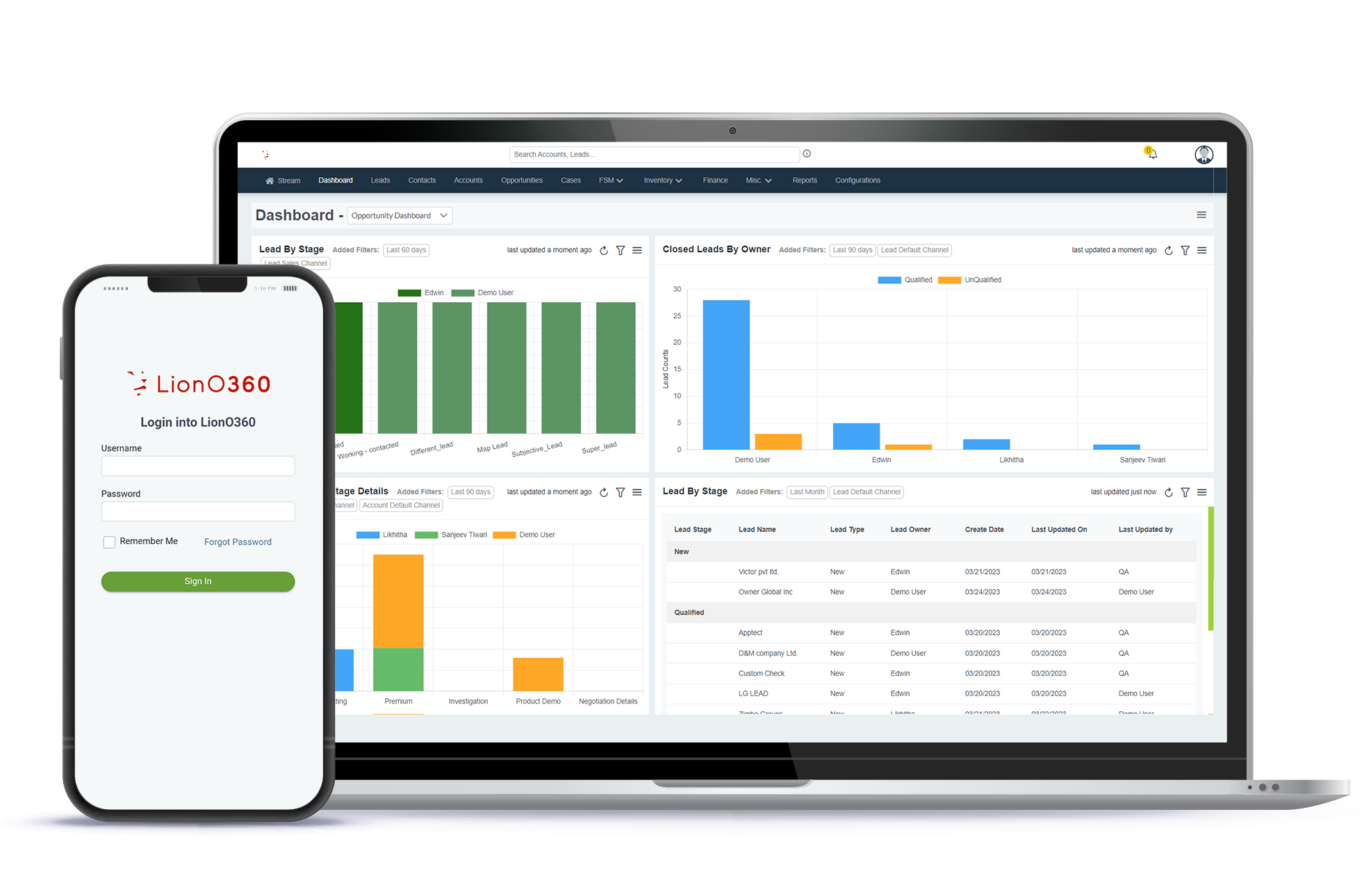
LionO360 is built for small and growing businesses that need real tools without the complexity of big enterprise systems. It is an all-in-one platform that combines CRM, ERP, and field service management. And its workflow automation features are some of the most practical you will find.
Here is what makes LionO360 stand out:
Time Based and Event Based Workflows
You can create workflows that run on a schedule or fire the moment something changes in your CRM. Both types of work across all the modules in the system, so your whole business can benefit, not just sales.
Nested Rules and Formula Functions
LionO360 lets you build advanced automation by grouping conditions inside conditions. This means you can set up complex logic without needing a developer. If deal value is over a certain amount and the lead came from a specific source and the contact is in a specific region, then do this specific thing.
Saved Searches Combined with Workflows
One of the most useful features in LionO360 is the Saved Searches module. You can create custom filters for your data and then connect them directly to workflows. This means you can automatically share reports with the right people at the right time, with no manual pulling or emailing required.
Workflow Copying and Reuse
If you have a workflow that works well, you can copy its conditions, including all the nested rules, and reuse them in new workflows. This saves a huge amount of time when you are setting up similar automation across different parts of your business.
Workspace Management
LionO360 also gives you a workspace tool where you can see your data in different views, from grid style to board style, and manage records without switching between different tools. This works hand in hand with your workflows to keep everything moving smoothly.
Ecommerce Integration
For businesses running an online store, LionO360 connects with platforms like nopCommerce. This means your ecommerce CRM system and your store share the same data. When a customer buys something online, your CRM knows about it instantly and can trigger the right workflow right away.
AI Powered Tools
LionO360 also brings AI into the mix. From AI based lead scoring to a built-in AI email writing tool, the system helps your team work smarter without needing to become tech experts.
The goal of LionO360 is simple: give small businesses the kind of automation power that used to be available only to large companies, at a price and a level of ease that actually makes sense for growing teams.
If you want to see how CRM workflow automation can work for your specific business, you can explore all the features at LionO360 Workflow Automation or book a free demo to see it live.
Related Blog: E-commerce CRM: Build Stronger Customer Connections
Frequently Asked Questions
What is CRM workflow automation?
CRM workflow automation is the process of setting up rules inside your CRM system that automatically complete tasks when certain conditions are met. For example, when a new lead comes in, the CRM can automatically send a welcome email, assign the lead to a sales rep, and create a follow up task, all without anyone doing it by hand. It reduces manual work, removes human error, and keeps your team focused on the things that need real attention.
How does CRM workflow automation help a sales team?
CRM sales software with automation takes over the routine parts of the sales process, like sending follow up emails, updating deal stages, assigning leads, and setting reminders.
Can an ecommerce CRM system use workflow automation?
Yes, and it is one of the most powerful ways to use automation. An ecommerce CRM system connected to your online store can trigger workflows based on customer actions.
How do I know which tasks to automate first?
Start with the tasks your team does most often and that follow a clear, repeatable pattern. Lead follow up emails, new lead assignments, deal stage updates, and customer notifications are all great starting points.