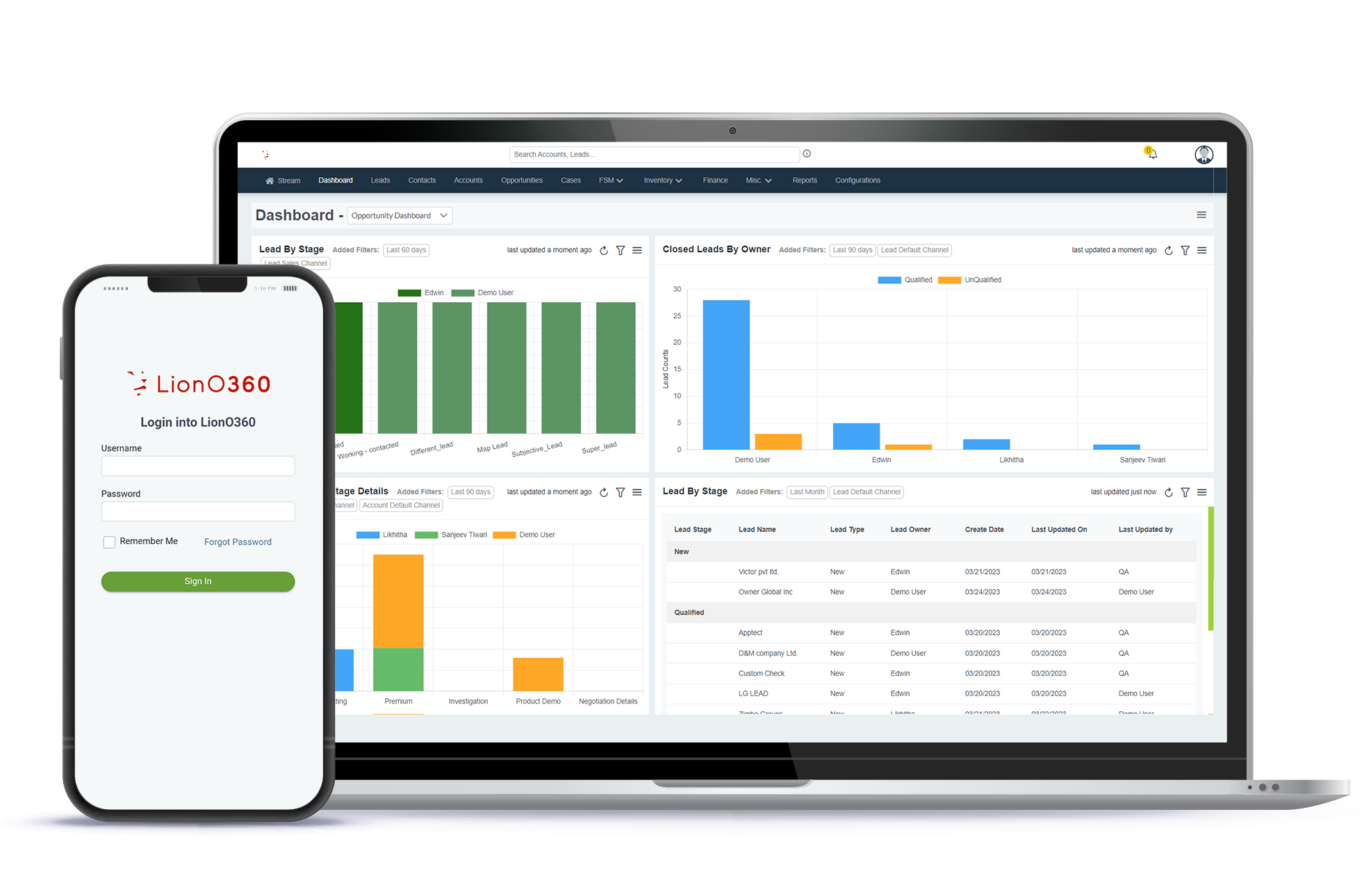

When your sales and field teams work out of the exact same system, tracking sales territories gets a whole lot easier. Good territory management is all about pairing the right reps with the right customers and locations to boost sales. By bringing your setup together under LionO360 CRM and LionO360 Field Service Management (FSM), you can look at client notes, set up field visits, hand out tasks, and track sales performance in one spot. This keeps your field teams connected, cuts down on paperwork, and gives you clear data to make smart business moves.
Introduction
Watching your business grow is an amazing feeling, but scaling up always brings a fresh set of challenges. As your customer list grows, keeping up with sales reps, client meetings, follow-ups, and service calls quickly turns into a massive juggling act.
Without a solid plan, your team can easily lose its balance. Some sales territories end up completely buried under too much work, while other regions barely get any attention at all. That gap in coverage usually means you miss out on great deals and end up with frustrated buyers.
That is exactly why smart territory management matters so much for a growing company. A clear plan helps your sales reps spend their energy on the best accounts instead of wasting hours driving around or hunting down old customer files. It also helps managers divide the workload fairly so the whole team performs better.
Old-school type spreadsheets and paper records just cannot keep up anymore. Today, sales reps need live client data on the road, and field service teams need exact schedules and work orders. When these teams do not talk to each other, communication breaks down and slows your entire business down.
By linking LionO360 CRM with LionO360 Field Service Management (FSM), you bridge that gap completely. Customer profiles, appointments, service histories, and live field updates all stay in one organized place, helping your team move faster and take better care of your clients.
Key Takeaways
| Key Point | Benefit |
|---|---|
| Use CRM and FSM together | Keep sales and field teams connected |
| Organize sales territories | Reduce travel time and improve productivity |
| Track customer interactions | Build stronger customer relationships |
| Schedule field visits efficiently | Improve on-time service delivery |
| Access real-time business data | Make faster and smarter decisions |
| Automate daily processes | Save time and reduce manual work |
What is Sales Territory Management?
At its core, sales territory management means dividing your customers, neighborhoods, or markets into specific zones and giving each zone to a dedicated sales rep. The main goal is simple: let each salesperson focus entirely on their own area instead of bouncing around between random, far-apart clients.
When you organize your territories correctly, building strong customer relationships gets much easier. Your sales reps can spend more time actually closing deals and less time stuck in traffic. This setup also makes life easier for managers, who can track performance more accurately since every rep has a clearly defined patch of ground to cover.
Keep in mind that smart territory planning goes beyond just drawing lines on a map. You can also group your accounts by the type of customer, the size of their business, the specific products they buy, or how much they are likely to spend. The right method simply depends on what your company is trying to achieve.
Why Territory Sales Management Matters?
Fixing your sales territories keeps your team from burning out. When you divide accounts fairly, your reps know exactly who to call and where to go each day. It takes the chaos out of their weekly schedule.
Customers notice the difference right away. They get a single, reliable point of contact who actually knows their business history. That consistency builds real loyalty and keeps them buying from you instead of a competitor.
For leadership, proper mapping removes the guesswork. You can instantly spot which zip codes are hitting quotas and which areas need extra support. That data makes it simple to plan your next hiring wave or expansion move.
Common Roadblocks in Territory Management
Most growing businesses run into the same few roadblocks when trying to organize their sales field. These slip-ups quickly slow down your reps and annoy your buyers.
Overburdened Reps
It is very common for a few reps to get buried under way too many accounts, while other reps are left with empty calendars. This imbalance hurts team morale and tanks your overall sales numbers.
Communication Gaps
When your sales reps and field technicians use completely different software, customer notes get lost in translation. Important updates get delayed, and your teams end up totally out of sync.
Paperwork and Spreadsheets
Building territories on old-school spreadsheets takes hours and opens the door for costly mistakes. As your business grows, updating all that data by hand becomes an absolute nightmare.
Blind Spots for Managers
Without a live system, managers have a hard time knowing where their field teams are, which clients got a visit, and what follow-ups still need to happen.
Dropped Balls
When territories lack structure, valuable things slip through the cracks. Your team might miss a critical follow-up meeting, delay a service request, or completely overlook a major sale.
How LionO360 CRM Helps Manage Sales Territories?
A CRM is much more than a customer database. It gives sales teams the information they need to manage customer relationships, plan activities, and improve productivity.
With LionO360 CRM, businesses can organize customer information in one place, making it easier for sales representatives to access account details whenever they need them. Instead of searching through emails or spreadsheets, representatives can quickly review customer history, communication records, sales opportunities, and follow-up activities before meeting a customer.
Managers also gain better visibility into sales performance through reports and dashboards. This helps them monitor territory performance, identify trends, and support their teams with better planning.
By keeping customer information accurate and up to date, LionO360 CRM helps businesses improve collaboration and maintain stronger customer relationships.
How Does LionO360 Field Service Management Support Territory Sales Management?
Managing customer relationships is only one part of the process. Businesses also need to handle field visits, service appointments, work orders, and technician schedules efficiently.
LionO360 Field Service Management (FSM) helps organize field operations by connecting office staff, managers, technicians, and sales representatives through one platform.
Service requests can be assigned quickly, work orders can be tracked easily, and field teams receive the information they need before arriving at customer locations.
Managers can monitor ongoing activities, schedule appointments more effectively, and ensure field teams complete tasks on time. This improves coordination between sales and service teams while providing customers with a smoother experience.
Why CRM and FSM Work Better Together?
Too many companies run sales on one app and field service on another. It instantly creates a communication gap because data sits trapped in separate systems.
When you combine CRM and FSM, everyone looks at the exact same customer profile.
Say a salesperson closes a major deal. The service team sees those updates right away. They can schedule setup or maintenance without calling the client to double-check their details all over again.
The reverse works just as well. Once a technician leaves a job site, they update the work status on the fly. Your sales reps know exactly what got done before they ever pick up the phone to talk about future upgrades.
This connected setup keeps everyone aligned, eliminates standard project delays, and builds a much smoother customer experience from day one.
How LionO360 CRM + FSM Improves Daily Sales Operations?
Managing a sales territory isn't just a matter of drawing boundaries on a map. Your real goal is making sure no client gets ignored. When your sales reps and field teams use a shared data setup, everything runs better.
Imagine a rep visiting a client. Right from the CRM, they log the notes and set a quick follow-up. Say that client suddenly needs an install or a quick maintenance check. Instead of hunting down the service crew or logging into another app, the request routes straight over to the field team. No one has to bounce back and forth between different software programs.
This is where using both LionO360 CRM and Field Service Management together really helps. Every single update stays right in one spot. Sales reps can see exactly when a tech finishes a job, and the tech can check out client history before walking up to the door.
You won't have to worry about communication delays or double-booking the same task.
In the end, this keeps your workflow moving quickly, closes communication gaps, and gives your customers a much more professional experience.
Features That Support Better Sales Territory Management
LionO360 builds tools to keep your sales and field crews organized without the usual mess.
Customer Information in One Place
Reps get full client profiles, details, and account notes on a single screen. No digging around before meetings. They just log in, review the history, and walk in prepared.
Activity and Task Management
Track your daily follow-ups, calendars, and reminders in one view. It keeps the day structured so critical client calls don't drop through the cracks.
Work Order Management
Turn service requests into actual work orders instantly, then hand them off to the right tech. It lets managers track real progress to make sure jobs wrap up on time.
Scheduling and Dispatching
Book field visits based on who is actually free and nearby. This cuts down on windshield time and stops your team from wasting hours on the road.
Real-Time Updates
Techs update their job status right from the job site. Your office crew and sales reps see those changes instantly, meaning zero wait time for manual updates.
Reports and Dashboards
Keep tabs on sales metrics and field progress via visual dashboards. These quick snapshots give you the data you need to make smart, fast business moves.
CRM vs CRM + FSM for Territory Management
| Feature | CRM Only | CRM + LionO360 FSM |
|---|---|---|
| Customer Data Management | Yes | Yes |
| Sales Activity Tracking | Yes | Yes |
| Lead & Opportunity Management | Yes | Yes |
| Field Visit Scheduling | Limited | Yes |
| Work Order Management | No | Yes |
| Technician Coordination | No | Yes |
| Real-Time Field Updates | No | Yes |
| Better Sales & Service Collaboration | Limited | Yes |
| Improved Customer Experience | Good | Excellent |
Why Using LionO360 CRM and FSM Together Matters
Connecting your sales and field crews brings major upgrades to your whole company.
For Sales Reps
Instead of digging around for account notes, reps can instantly pull up profiles. This means they spend less time hunting down data and more time talking to clients.
For Field Teams
Techs get full job details way before they head out. It gives them the head-start they need to prep early and wrap up tasks without wasting time.
For Managers
Get a crystal-clear look at daily operations. This visibility makes it easy to track team performance and put resources exactly where they belong.
For Customers
Clients get faster replies, clear answers, and dependable support from day one.
Plus, as your business expands, a single setup scales right alongside you, managing larger teams, handling new territories, and keeping up with growing customer demands becomes much simpler.
Wrapping Up
Territory sales management isn't just about splitting up clients on a map. It actually works when you give reps the right tools, fresh client data, and a clear look at their daily tasks.
By running your territories through both LionO360 CRM and Field Service Management, you bring sales and field ops onto a single platform. Managing customer files, site visits, active work orders, calendars, and team becomes incredibly straightforward.
Moving away from manual entry and disjointed apps allows your team to get more done. It helps you strengthen client ties and make quick decisions based on live, accurate data.
Whether you are expanding into new markets across India or just fixing your current sales setup, bringing CRM and FSM together makes territory management a lot simpler. It’s the easiest way to keep your operations smooth and your clients happy.
Frequently Asked Questions
1. What is sales territory management?
Sales territory management means splitting up your clients, regions, or target markets into specific areas and handing them over to your sales reps. This setup gives your team a clear focus, helps them reach more clients, and boosts overall sales.
2. What makes territory sales management so critical for businesses?
Without it, some reps get overloaded while others have empty calendars. It balances out that workload. Plus, keeping sales tasks organized cuts down on wasted travel time, builds stronger client ties, and helps your team hit their targets.
3. How does CRM help manage sales territories?
A CRM saves all your customer data, logs sales activities, tracks follow-up tasks, and generates reports. This keeps your reps and managers organized so they can run their territories efficiently.
4. What does Field Service Management actually do for your team?
It handles the heavy lifting for your site visits. The tool helps you schedule appointments, track work orders, and dispatch field techs so your back-office staff and road crews stay on the same page.
5. Does your company really need both CRM and FSM?
Putting CRM and FSM on a single platform bridges the gap between your sales and service crews. It reduces tedious manual entry, streamlines internal communication, and gives clients a smoother experience from the first call to the final service. But yes, it totally depends on your specific business type and needs.