

When we hear "CRM," we often think of sales pipelines, lead nurturing, and revenue generation. But Customer Relationship Management (CRM) tools aren't only for sales. It is driving faster resolution as a customer support teams.
Now, where customer satisfaction directly impacts on brand name, support teams have to work smarter and faster. With stronger collaboration, a CRM provides the framework that enables that. Far from being a tool only for sales agents, a CRM system can be the backbone of efficient, personalized, and timely customer service.
The New Customer Support Landscape
Speed, accuracy, and empathy are the demands of customers in 2025. They expect it to be across every channel like email, chat, social media, and on call. Customer support agents are no longer problem-solvers; they are experienced creators. Customer expectations come following challenges:
- Manage high volumes of tickets
- Juggling conversations across many channels
- Updated with each customer’s history and context
- Maintaining response time and resolution SLAs
Without a CRM: Support Teams Face Hidden Chaos
Let’s paint a picture. Imagine a support team banking on only email, sheets, or disconnected chat platforms. Then, they have to face issues like:
- Sprinkled Data: Information stored in various locations, making it hard to get a 360° view of a customer.
- Repeated Call: Every time a customer has to repeat their issue for a different agent.
- Missing logs: Difficult to get customer history. It leads to impersonal or incorrect responses.
- Slow Resolutions: Manual effort increases, dragging down response speed and customer satisfaction.
These pain points make customers frustrated and also demotivate your support team.
How CRMs Solve These Challenges
Let’s explore how a CRM turns reactive support into proactive service:
Centralized Customer Information
One of the best aspects of a CRM is a unified view of the customer. Support agents never have to sift through emails or jumbled tools to glean background context about a customer. CRM proactively lets them see a complete picture of a customer profile—previous interactions, purchase history, ticket history—so every conversation can be informed, personalized, and productive from the start.
Faster Response and Resolution Times
CRMs can also speed up your support operations, by automating a lot of repetitive tasks. Canned responses, auto-assigning tickets, smart categorization, and AI recommendations let agents answer requests faster and with greater accuracy. This improves wait time for customers and lets the team handle more requests without first losing customer service quality.
Collaborative Support
Most CRMs come with powerful communications features throughout the support team, such as internal notes, mentions, and tagging. If a ticket needs to be escalated or input from another department, the handoff is easy and documented. Everyone added to the ticket can see everything, eliminating confusion and providing accountability.
Omnichannel Support in One View
Customers now contact businesses through many different channels, whether it is email, chat, social, or phone. CRMs can include all of these channels into a single system, so agents, and/or teams can utilize a central interface to continue all conversations without switching tools.
Essential CRM Features for Customer Support Teams
If you are assessing CRMs for your support team, look for features like:
- Prioritize and assign tickets based on urgency and category.
- Share help articles directly within chat/email threads.
- View complete customer history in one click.
- Handle basic queries instantly, reducing ticket volume.
- Ensure timely responses and avoid delays.
- Collect customer feedback right after a resolution.
CRM for Support vs. Sales: What’s the Difference?
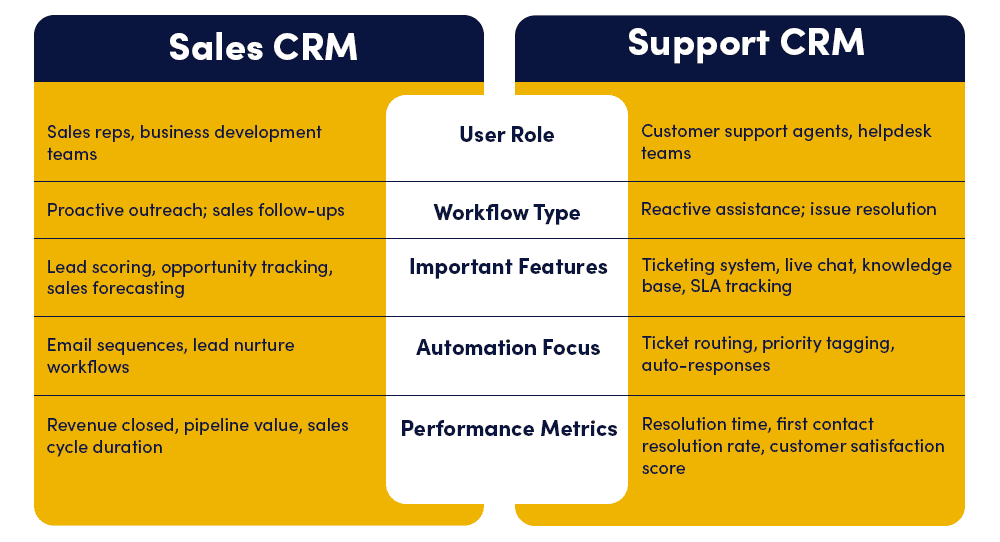
Sales CRMs focus on pipelines, lead scoring, and conversions. Support CRMs, on the other hand, are design for ongoing customer engagement, ticket resolution, customer retention and satisfaction. The workflows, dashboards, and KPIs are entirely different. This is why many platforms today offer dedicated service modules or CRMs optimized for support use.
Bonus: Integrating CRM with Support Tools
Your CRM should smoothly integrate with:
- Email clients
- Live chat platforms
- E-commerce platforms
- Helpdesk tools
Why Do Your Support Teams Need LionO360 CRM?

A successful CRM will not only hold information, but also allows support teams to deliver quicker, smarter and more human support experiences. In this era of choice, where every customer has an abundance of options, your customer service is your competitive advantage, and LionO360 CRM is designed to help you maintain and leverage this advantage. Therefore, regardless of whether you are scaling your business or just trying to deliver support more efficiently, LionOBytes, a high-quality and powerful CRM is not a luxury, it is a necessity. These functionalities eliminate redundancy and save time in resolving issues.
LionO360 CRM, a product by the LionOBytes; enhances support experiences with strong omnichannel integration. From email, to live chat, phone, or social, LionO360 brings every communication into one cohesive interface with the same consistent and timely response.
Schedule a free CRM demo and unlock efficiency in every customer interaction!
Frequently Asked Questions
What is CRM for Customer Support, and how does it differ from its traditional sales focus?
Customer Relationship Management (CRM) tools are vital for customer support teams, serving as the backbone for efficient, personalized, and timely service delivery, leading to faster resolutions and increased customer satisfaction. While sales CRMs concentrate on sales pipelines, lead nurturing, and revenue generation, support CRMs are specifically designed for ongoing customer engagement, ticket resolution, customer retention, and overall satisfaction, featuring distinct workflows and key performance indicators (KPIs).
What are the key challenges faced by customer support teams in today's environment?
Support teams face challenges like managing high volumes of tickets, juggling conversations across multiple channels, staying updated with each customer’s history and context, and maintaining response time and resolution Service Level Agreements (SLAs). Without a CRM, teams often struggle with scattered data, customers having to repeat their issues, missing interaction logs, and slow resolutions, leading to customer frustration and team demotivation.
How does a CRM system help customer support teams overcome these challenges?
A CRM system transforms reactive support into proactive service by providing a centralized repository for all customer information. This unified view allows agents to access a complete customer profile—including previous interactions, purchase history, and ticket history—enabling informed, personalized, and productive conversations from the outset. CRMs also automate repetitive tasks, facilitate collaboration, and consolidate omnichannel communications into a single interface.
What essential features should I look for in a CRM for my customer support team?
When assessing CRMs for your support team, prioritize features that allow you to: prioritize and assign tickets based on urgency and category, share help articles directly within customer interactions, view complete customer history in one click, handle basic queries instantly through automation to reduce ticket volume, ensure timely responses and avoid delays, and collect customer feedback right after a resolution.